WELCOME

for any suggestion's please mail to this id:

nanduriraja537@gmail.com,raja.mic539@gmail.com

Saturday, January 14, 2012

Questions you can Never Answer


Why doesn't Tarzan have a beard?
Why do we press harder on a remote control when we know the batteries are flat?
Why do banks charge a fee on 'insufficient funds' when they know there is not enough?
What is the speed of darkness?
Why is it that people say they 'slept like a baby' when babies wake up every two hours?
If the temperature is zero outside today and it's going to be twice as cold tomorrow, how cold will it be?
Do married people live longer than single ones or does it only seem longer?
How is it that we put man on the moon before we figured out it would be a good idea to put wheels on luggage?
Why do people pay to go up tall buildings and then put money in binoculars to look at things on the ground?
Did you ever stop and wonder...... .
Who was the first person to look at a cow and say, 'I think I'll squeeze these pink dangly things here, and drink whatever comes out?'
Who was the first person to say, 'See that chicken there... I'm gonna eat the next thing that comes outta its bum.'
Why do toasters always have a setting so high that could burn the toast to a horrible crisp, which no decent human being would eat?
Why is there a light in the fridge and not in the freezer?
Why do people point to their wrist when asking for the time, but don't point to their bum when they ask where the bathroom is?
Why does your Obstetrician, Gynaecologist leave the room when you get undressed if they are going to look up there anyway?
Why does Goofy stand erect while Pluto remains on all fours? They're both dogs!
If quizzes are quizzical, what are tests?
If corn oil is made from corn, and vegetable oil is made from vegetables, then what is baby oil made from?
If electricity comes from electrons, does morality come from morons?
Why do the Alphabet Song and Twinkle Twinkle Little Star have the same tune?
Stop singing and read on.........
Do illiterate people get the full effect of Alphabet Soup?
Did you ever notice that when you blow in a dog's face, he gets mad at you, but when you take him on a car ride, he sticks his head out the window?
Does pushing the elevator button more than once make it arrive faster?
Do you ever wonder why you gave me your e-mail address in the first place?


--
"Apologizing does not mean that you are wrong and the other one is right...
It simply means that you value the relationship much more than yo

vDefinitions, some of them new (to me)


These fit so well they should be in a dictionary.


ADULT:

A person who has stopped growing at both ends
and is now growing in the middle.


BEAUTY PARLOR:

A place where women curl up and dye.


CHICKENS:

The only animals you eat before they are born and after they are dead.


COMMITTEE:

A body that keeps minutes and wastes hours.


DUST:

Mud with the juice squeezed out.


EGOTIST:

Someone who is usually me-deep in conversation.


HANDKERCHIEF:

Cold Storage.


INFLATION:

Cutting money in half without damaging the paper.


MOSQUITO:

An insect that makes you like flies better.


RAISIN:

A grape with a sunburn.


SECRET:

Something you tell to one person at a time.


SKELETON:

A bunch of bones with the person scraped off.


TOOTHACHE:

The pain that drives you to extraction.


TOMORROW:

One of the greatest labor saving devices of today.


YAWN:

An honest opinion openly expressed.

Temporarily Disable "Restart Now" Dialog from XP's Automatic Updates

Automatic Updates is a great feature. Your computer stays protected from threats without worrying about it… but if it's 3am and I'm trying to play a video game, the last thing I want is for the automatic updates to pop up and remind me every 5 minutes that I need to reboot, interrupting my game… Drives me crazy!

Dear Restart Dialog,

I hate you.

Temporarily Disable "Restart Now" Dialog from XP's Automatic Updates

If you want to temporarily disable this popup message and delay rebooting, you can go about it one of two ways. I'm a command line junkie, so I just type this into a command prompt (make sure you use the quotes)

net stop "automatic updates"

Or you can open Control Panel \ Administrative Tools \ Services and click Stop on automatic updates.

Temporarily Disable "Restart Now" Dialog from XP's Automatic Updates

Do not disable the automatic updates service, just stop it. The next time you start up your computer, it will restart.

Note: If you open the Automatic Updates icon in Control Panel, it will automatically restart the service, which will make the dialog start popping up again.

Basics of Javascript Injection


JavaScript is a widely used technology within websites and web based applications. JavaScript can be used for all sorts of useful things and functions. But along with this comes some additional security issues that need to be thought of and tested for. JavaScript can be used not only for good purposes, but also for malicious purposes.JavaScript injection is a nifty little technique that allows you to alter a sites contents without actually leaving the site.This can be very usefull when say, you need to spoof the server by editing some form options.JavaScript injection is a fun technique that allows you to change a websites content without leaving the site, reloading the page, or saving the site to your desktop. It can be very useful when you need to change hidden data before you send it to the server. Let’s start with some basic injection techniques.

I. Injection Basics
JavaScript injections are run from the URL bar of the page you are visiting. To use them, you must first completly empty the URL from the URL bar. That means no "http://" or whatever.
JavaScript is run from the URL bar by using the javascript: protocol. In this tutorial I will only teach you the bare bones of using this, but if you are a JavaScript guru, you can expand on this using plain old JavaScript.
The two commands covered in this tutorial are the alert(); and void(); commands. These are pretty much all you will need in most situations. For your first JavaScript, you will make a simple window appear, first go to any website and then type the following into your URL bar:

javascript:alert(’Hello, World’);
You should get a little dialog box that says “Hello, World”. This will be altered later to have more practical uses.
You can also have more than one command run at the same time:
javascript:alert(’Hello’); alert(’World’);
This would pop up a box that said ‘Hello’ and than another that says ‘World’.

II. Cookie Editing
First off, check to see if the site you are visiting has set any cookies by using this script:
javascript:alert(document.cookie);
This will pop up any information stored in the sites cookies. To edit any information, we make use of the void(); command.
javascript:void(document.cookie=”Field = myValue”);
This command can either alter existing information or create entirely new values. Replace “Field” with either an existing field found using the alert(document.cookie); command, or insert your very own value. Then replace “myValue” with whatever you want the field to be. For example:
javascript:void(document.cookie=”Authorized=yes”);
Would either make the field “authorized” or edit it to say “yes”… now whether or not this does anything of value depends on the site you are injecting it on.
It is also useful to tack an alert(document.cookie); at the end of the same line to see what effect your altering had.

III. Form Editing
Sometimes, to edit values sent to a given website through a form, you can simply download that html and edit it slightly to allow you to submit what you want. However, sometimes the website checks to see if you actually submitted it from the website you were supposed to. To get around this, we can just edit the form straight from javascript. Note: The changes are only temporary, so it’s no tuse trying to deface a site through javascript injection like this.
Every form on a given webpage (unless named otherwise) is stored in the forms[x] array… where “x” is the number, in order from top to bottom, of all the forms in a page. Note that the forms start at 0, so the first form on the page would actually be 0, and the second would be 1 and so on. Lets take this example:
http://www.website.com/submit.php” method=”post”>
Note:Since this is the first form on the page, it is forms[0]
Say this form was used to email, say vital server information to the admin of the website. You can’t just download the script and edit it because the submit.php page looks for a referer. You can check to see what value a certain form element has by using this script:
javascript:alert(document.forms[0].to.value)
This is similar to the alert(document.cookie); discussed previously.
In this case, It would pop up an alert that says “admin@website.com”
So here’s how to Inject your email into it. You can use pretty much the same technique as the cookies editing shown earlier:
javascript:void(document.forms[0].to.value=”email@nhacks.com”)
This would change the email of the form to be “email@nhacks.com”.
Then you could use the alert(); script shown above to check your work. Or you can couple both of these commands on one line.
That completes this post about JavaScript injection as you can see all kinds of fun things can be done with these techniques. Use your imagination and with a little work you can test your site and keep it secure from malicious hackers.

List of Useful Easy Run Command For MS Outlook

Click start > run> insert run command > hit OK

/cleanautocompletecache

Removes all names from the AutoComplete list

e-mail addresses from the AutoComplete list

Work with Version – 2010

/cleancategories

Deletes any custom category names that you have created.

Restores categories to the default names.

Work with Version – 2007,

Work with Version – 2010

/cleanclientrules

Deletes client-based rules.

Work with Version – 2003,

Work with Version – 2007,

Work with Version – 2010

/cleanprofile

Removes invalid profile keys and recreates default registry keys where applicable.

Work with Version – 2003,

Work with Version – 2007

/cleanpst

Launches Outlook with a clean Personal Folders file (.pst)

Work with Version – 2003

/cleanreminders

Clears and regenerates reminders.

Work with Version – 2000,

Work with Version – 2002/XP,

Work with Version – 2003, Work

with Version – 2007,

Work with Version – 2010

/cleanroamedprefs

All previous roamed preferences are deleted and copied again from the local settings on the computer where this switch is used. This includes the roaming settings for reminders, free/busy grid, working hours, calendar publishing, and RSS rules.

Work with Version – 2007,

Work with Version – 2010

/cleanrules

Starts Outlook and deletes client- and server-based rules.

Work with Version – 2003,

Work with Version – 2007,

Work with Version – 2010

/cleanserverrules

Starts Outlook and deletes server-based rules.

Work with Version – 2003,

Work with Version – 2007,

Work with Version – 2010

/cleansharing

Removes all RSS, Internet Calendar, and SharePoint subscriptions from Account Settings, but leaves all the previously downloaded content on computer. This is useful if you cannot delete one of these subscriptions within Outlook

Work with Version – 2010

/cleansniff

Deletes duplicate reminder messages

Work with Version – 2003,

Work with Version – 2007,

Work with Version – 2010

/cleansubscriptions

Deletes the subscription messages and properties for subscription features.

Work with Version – 2003,

Work with Version – 2007,

Work with Version – 2010

/nocustomize

Starts Outlook without loading outcmd.dat (customized toolbars) and *.fav file.

Work with Version – 2003,

Work with Version – 2007

/noextensions

Starts Outlook with extensions turned off, but listed in the Add-In Manager.

Work with Version – 2003,

Work with Version – 2007

/nopollmail

Starts Outlook without checking mail at startup.

Work with Version – 2003

/nopreview

Starts Outlook with the Reading Pane off and removes the option from the View menu.

Work with Version – 2000,

Work with Version – 2002/XP,

Work with Version – 2003,

Work with Version – 2007,

Work with Version – 2010

/regserver

Rewrites all Outlook specific registry keys and re-associates file extensions without having to reinstall Outlook or run setup with the /y switch. The settings are stored in the Outlook.srg file located in the same folder as the Outlook program.

Work with Version – 2000,

Work with Version – 2002/XP

/resetfoldernames

Resets default folder names (such as Inbox or Sent Items) to default names in the current Office user interface language. For example, if you first connect to your mailbox Outlook using a Spanish user interface, the Spanish default folder names cannot be renamed. To change the default folder names to another language such as Japanese or English, you can use this switch to reset the default folder names after changing the user interface language or installing a different language Work with Version of Outlook.

Work with Version – 2002/XP,

Work with Version – 2003,

Work with Version – 2007,

Work with Version – 2010

/resetfolders

Restores missing folders for the default delivery location.

Work with Version – 2000,

Work with Version – 2002/XP,

Work with Version – 2003,

Work with Version – 2007,

Work with Version – 2010

/resetoutlookbar

Rebuilds the Outlook Bar.

Work with Version – 2000,

Work with Version – 2002/XP

/resetnavpane

Clears and regenerates the Navigation Pane for the current profile.

Work with Version – 2003,

Work with Version – 2007,

Work with Version – 2010

/safe

Starts Outlook without extensions, Reading Pane, or toolbar customization.

Work with Version – 2000,

Work with Version – 2002/XP,

Work with Version – 2003,

Work with Version – 2007,

Work with Version – 2010

/safe:1

Starts Outlook with the Reading Pane off.

Work with Version – 2003,

Work with Version – 2007,

Work with Version – 2010

/safe:2

Starts Outlook without checking mail at startup.

Work with Version – 2003

/safe:3

Starts Outlook with extensions turned off, but listed in the Add-In Manager.

Work with Version – 2003,

Work with Version – 2007,

Work with Version – 2010

/safe:4

Starts Outlook without loading Outcmd.dat (customized toolbars) and *.fav file.

Work with Version – 2003,

Work with Version – 2007

Youtube Copyright claim Bypass is Possible : Watch Copyright claim Videos on Youtube

Youtube Copyright claim Bypass is Possible : Watch Copyright claim Videos on Youtube

Hey friends, you might be shocked by my last post. It was a Chikni Chameli Video Song. After posting it, I received tons of mail from our readers that they never expected from my side to post such thing on my blog.. LOLzz... even I myself never expected the same. But let me clear that it was part of my testing.

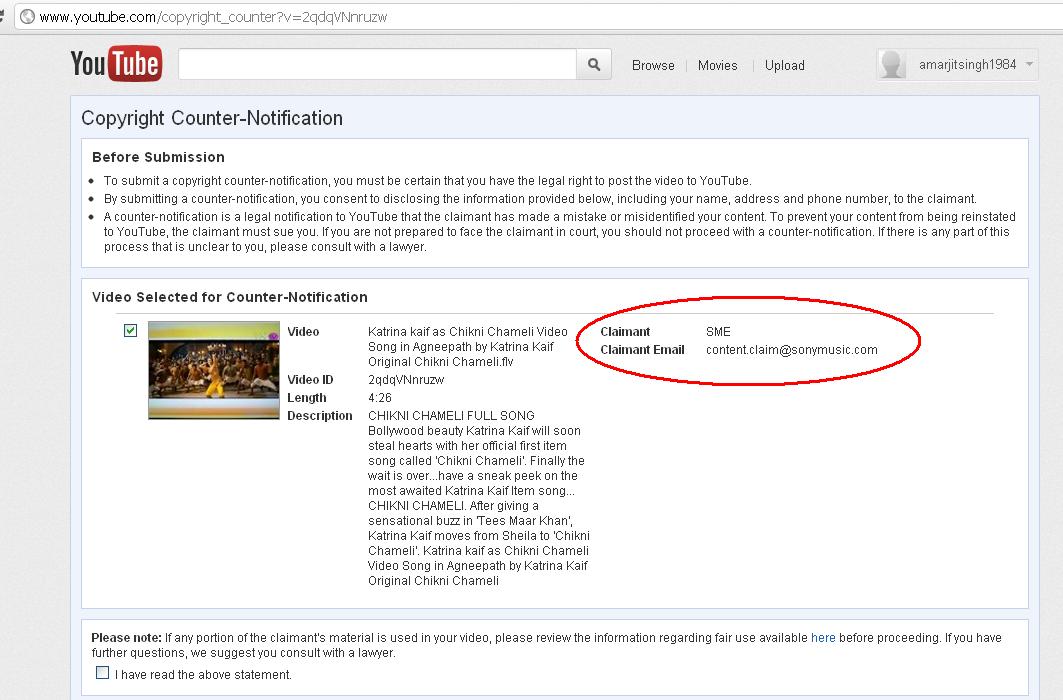
Actually one of my friend was searching for Chikni Chameli full video song on internet. When he was unsuccessful to locate, he called me up for help. I found that really NO full video song is available any where on any site or blog. After little bit of googling I found that SONY is banning all such video songs by claiming copy rights. Suddenly I started experiments on various methods to bypass Youtube Copyright claim. The Chikni Chameli Video Song I posted was part of that testing... :P

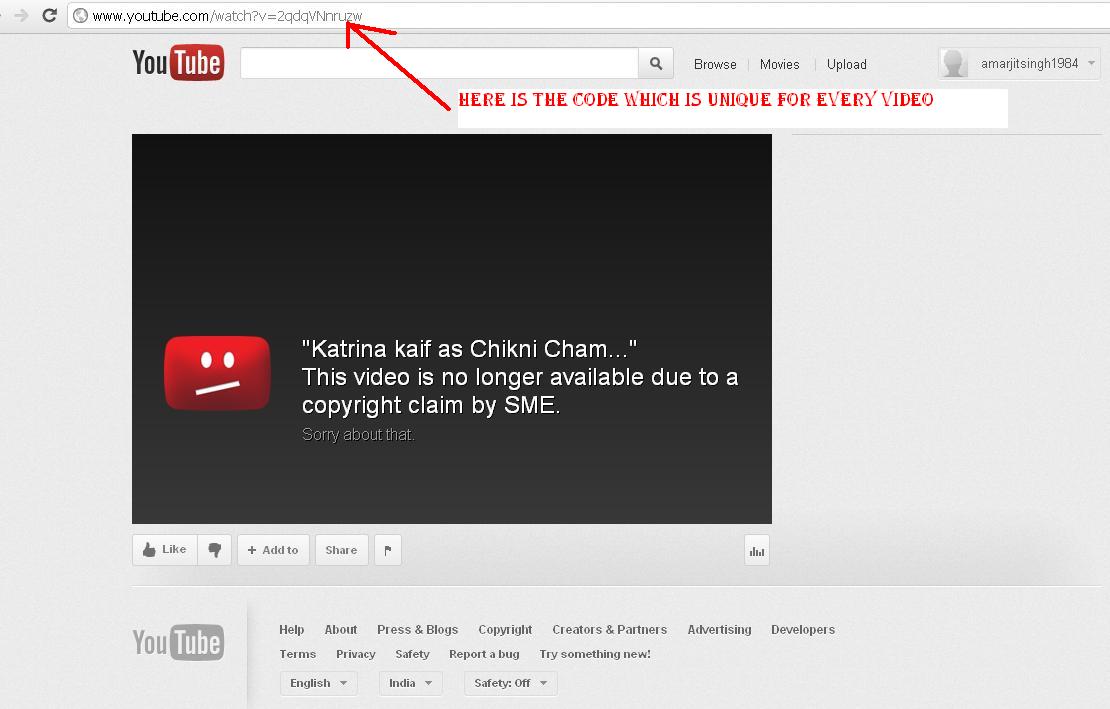
Check the below pic which is showing me on my YOUTUBE channel. Showing that song has been removed & This video is no longer available due to a copyright claim by SME. There was also one option for Copyright Counter-Notification. It strikes in my mind that YOUTUBE not removed the video, and its still available on GOOGLE server. This loophole was finally confirmed to me when I play the song from article posted on my blog www.amarjit.info with the help of video embedded code.


Now to bypass the copyright claim, just open the hyperlink where video is hosted on youtube. Note down the code uniquely generated for video.


Now to embed the video on any website or blog below is the code. You only need to change the code uniquely generated for video


Now copy paste this on any blog or site and click on publish. And yoooooo... vedio is available. Below is proof of concept.

Youtube link for the video: http://www.youtube.com/watch?v=2qdqVNnruzw

Amazing Paper USB Drive

Amazing Paper USB Drive'

Lebedev design studio has published his vision of what will be the USB-drives in the near future. According to the authors of the concept with the soulful title Fleshkus such storage media will be disposable due to its cheapness of production. Fleshkus will look like a box of paper vouchers matches. All necessary electronic filling will be placed on such separated modules.

Amazing Paper USB Drive'

Amazing Paper USB Drive'

Amazing Paper USB Drive'

LinkWithin

Related Posts Plugin for WordPress, Blogger...